
Free Shot List Template for Excel
Imports Directly Into CineLog Pro

Import in Seconds.
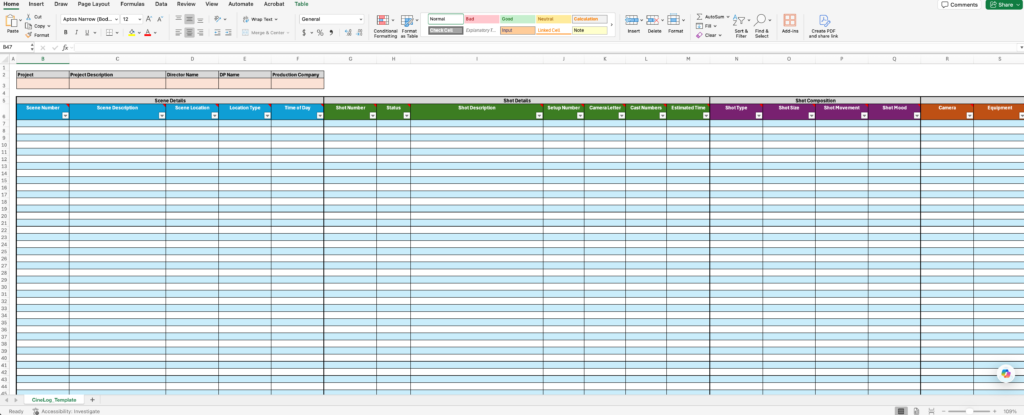
A clean, production-ready shot list template for Excel template built for real shoots. Fill it out anywhere, then import to create projects, scenes, and shots in CineLog Pro.
Start in Excel when you are offline or collaborating. When you are ready, import your file into CineLog Pro and keep the whole production organized.


Why Filmmakers Use This Shot List Template
Offline friendly planning
Build your shot list on a plane, on location, or anywhere you do not want to fight spotty internet.
Made for import, not just printing
The columns match real production metadata so CineLog Pro can turn your spreadsheet into structured scenes and shots.
Clear for the whole crew
Standardized fields help directors, DPs, ACs, and producers stay aligned on what you are shooting and how you are shooting it.
Fewer surprises on shoot day
Track lenses, camera settings, movement, time estimates, and notes in one place so your day stays on schedule.
Shot Lists 101
Planning coverage so nothing is missed
Estimating time per setup and building a realistic day
Communicating intent to your crew and collaborators
Capturing technical details like lenses, framing, movement, and notes
Keeping production and post aligned on what was captured
Excel is great for drafting. CineLog Pro is built for production. When you import your template, you can organize shots by project and scene, attach references, track progress, and keep everything ready for set life. The result is less scrambling and more shooting.
Start broad with masters, then add coverage, then inserts
Keep shot descriptions action-based and specific
Group by setups so you minimize unnecessary moves
Add time estimates and notes early so schedule issues show up before the shoot
Treat the shot list as a living plan, not a locked document
Join Our Newsletter
Subscribe to receive our latest updates in your inbox!